
Sometimes when working on the Virtual Desktop, you may need to open an app on your local computer’s desktop. Or maybe you are on the phone with a support tech and we need to run a LogMeIn session outside of the cloud.
There is an easy way to minimize your Virtual Desktop session without losing your session or having to sign out and back in.
_____________________________________________________________________________________
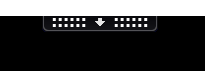
Step 1: Locate the black pull-down tab at the top of your Virtual Desktop screen and click on it.
Step 2: Click “Window”, on the expanded menu. This option will exit full-screen mode on the Virtual Desktop.

Comments
0 comments
Article is closed for comments.