
Sometimes when working in Citrix, you may need to open an app on your local computer’s desktop. Or maybe you are on the phone with a support tech and we need to run a LogMeIn session outside of the cloud.
There is an easy way to minimize your Citrix session without losing your session or having to sign out and back in.
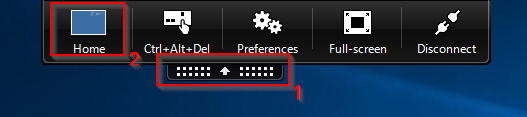
Locate the black pull-down tab at the top of your Citrix screen and click on it. Then hit the Home button on the left.
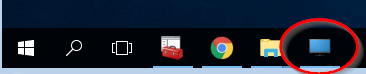
This will minimize your Citrix session into your local computer’s Taskbar. The icon will look like a blue computer monitor. When you are ready to go back into your Citrix session, click on the blue monitor icon.
For any questions, comments or feedback, email articlefeedback@cybasp.com.
Comments
0 comments
Please sign in to leave a comment.