
Let’s say your workday is coming to an end and now it is time to log off. Or maybe you need to switch computers. Or maybe its time to take a break. It is important to explain the 2 different states your session can end:
-
Disconnected
-
Log out
Disconnected means that your session is gone from your computer screen, BUT the session is still technically “running” on our servers. You can think of your session as it being in a suspended state. When you log back into Citrix, it will put you right back into your session just as you left it. This is good if you are going to hop off your session for lunch, or switching computers, but not recommended if you are logging off for the day.
Log Out means that your session is properly clearing and no longer existing. Anything you had open will be closed, and any unsaved work will be lost. This is the recommended way to log off when you are done working for the day, or if you are having session issues and need to “restart” your session.
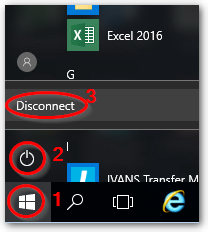
To Disconnect, you can click on the Start Menu, click on the Power icon, and hit Disconnect
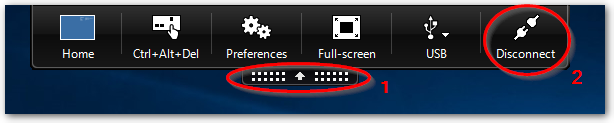
Alternatively, you can open the top black bar and hit Disconnect
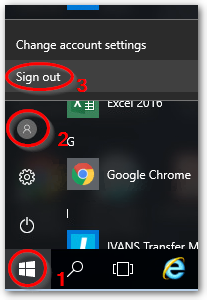
To Log Out, you can click on the Start Menu, click on the gray circle icon, and click Sign Out
For any questions, comments or feedback, email articlefeedback@cybasp.com.
Comments
0 comments
Please sign in to leave a comment.